Appointment Reminders

Need Solution to these problems

[ultimate_carousel slide_to_scroll=”single” slides_on_desk=”1″ slides_on_tabs=”1″ slides_on_mob=”1″ arrow_color=”#000000″ arrow_size=”36″ dots=”off”]

Too Many No-Shows

You Are unhappy with the number of patients who miss their scheduled appointments.

Staff Too Busy Making Reminder Calls

Your staff is tied up making manual calls to patients. They don t have time to do other important tasks.

[/ultimate_carousel]

70% Drop in No Shows!

“We average about 50 appointments a day, and we were just too busy to make manual calls so we had about 10 no-shows every day! Now, since we started using 1-800 Notify, our daily no shows have dropped down to 2 or 3. A 70% reduction in no-shows. The service has paid for itself in just the first day!”

Marcia McQueary, Office Manager for a Rheumatology Practice, Richmond, KY

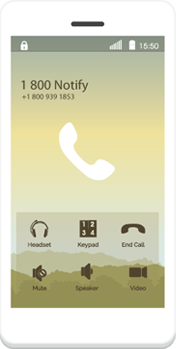
Phone Call

1Hello, this is Dr. Smith s office We are calling with an appointment reminder for [Mark Smith]. We welcome you as a new patient, please arrive 30 minutes early and bring your insurance cards, photo ID and co-pay.

—————-WHEN A PERSON ANSWERS, THIS IS THE ENDING:————–

2Press 1 to confirm, press 2 to connect to our office to reschedule or answer any questions, 3 to hear again.Thank you.

—————-When an answering machine / VM picks up:————–

3 If you need to change or cancel your appointment, please call our clinic at
___(your number)____
Reduce your patient no-shows up to 70% and save many hours of staff time with our convenient 2-way Appointment Reminders (Call, Text or Email)

[ult_buttons btn_title=”TRY IT NOW” btn_align=”ubtn-center” btn_size=”ubtn-custom” btn_width=”230″ btn_height=”60″ btn_padding_left=”20″ btn_padding_top=”20″ btn_title_color=”#ffffff” btn_bg_color=”#1e5774″ icon_size=”32″ btn_icon_pos=”ubtn-sep-icon-at-left” btn_font_family=”font_family:Arimo|font_call:Arimo” btn_font_size=”desktop:20px;”]

Phone Call Reminder Features

[bsf-info-box icon=”Defaults-envelope-o” icon_size=”32″ title=”Custom Message” hover_effect=”style_2″ pos=”top”]We can customize the message based on information we receive from your system. Common examples include arrive 30 minutes early for NEW PATIENT , remember to get your lab work done or no eating or drinking for 12 hours prior.[/bsf-info-box][bsf-info-box icon=”Defaults-exchange” icon_size=”32″ title=”Free Live Transfer” hover_effect=”style_2″ pos=”top”]Our system allows your patients to transfer back to your office to re-schedule or ask questions. This is a convenience for your patients and will keep your schedules more full.[/bsf-info-box]
[bsf-info-box icon=”Defaults-phone” icon_size=”32″ title=”Adjusting Calling Speed” hover_effect=”style_2″ pos=”top”]Whether you have 1 person at your front desk or an entire scheduling call center, we can adjust the speed of calls to meet your needs.[/bsf-info-box]
[bsf-info-box icon=”Defaults-group users” icon_size=”32″ title=”Caller ID Is Yours” hover_effect=”style_2″ pos=”top”]We can set the caller ID that displays to be your clinic. If you have several clinics, we can adjust the caller ID to be different for each clinic.[/bsf-info-box]
[bsf-info-box icon=”Defaults-globe” icon_size=”32″ title=”Patient Language” hover_effect=”style_2″ pos=”top”]If you need it, we can offer both English and Spanish language messages. And, if you can give us patient preference, we can start the message in the preferred language.[/bsf-info-box]
[bsf-info-box icon=”Defaults-desktop” icon_size=”32″ title=”Answering Machine Detection” hover_effect=”style_2″ pos=”top”]Our system can detect when an answering machine or voice mail has picked up and automatically adjust the message to remove the prompts.
[/bsf-info-box]
[bsf-info-box icon=”Defaults-microphone” icon_size=”32″ title=”Professional Recordings” hover_effect=”style_2″ pos=”top”]Usually, a human voice will keep your patients on the phone longer and yield better results. We offer professional voice recordings.[/bsf-info-box]
[bsf-info-box icon=”Defaults-repeat rotate-right” icon_size=”32″ title=”Busy or No Answer Re-Tries” hover_effect=”style_2″ pos=”top”]We re-try busy or no-answer numbers 3 times after a 15-minute waiting period between re-tries. You can adjust this waiting period to be shorter or longer. With the first attempt, this means 4 tries to every number more attempts = more connections.[/bsf-info-box]

Text Message

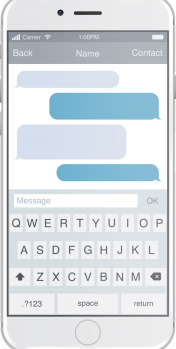
1Main St. Clinic Reminder:
Julie Smith has an appt. on Tue Jun 10 at 10:30am.
To CONFIRM: Reply Y To RESCHEDULE:
Call 333-222-111

2Patient taps to call…
(333) 222-1111

3…Re-Schedules Appt.
I’d like to re-schedule my appointment!
Avaoid no-shows.
Keep your schedule filles!
text-phone

Reduce your patient no-shows up to 70% and save many hours of staff time with our convenient 2-way Appointment Reminders (Call, Text or Email)

[ult_buttons btn_title=”TRY IT NOW” btn_align=”ubtn-center” btn_size=”ubtn-custom” btn_width=”230″ btn_height=”60″ btn_padding_left=”20″ btn_padding_top=”20″ btn_title_color=”#ffffff” btn_bg_color=”#1e5774″ icon_size=”32″ btn_icon_pos=”ubtn-sep-icon-at-left” btn_font_family=”font_family:Arimo|font_call:Arimo” btn_font_size=”desktop:20px;”]

Text Message Features

[bsf-info-box icon=”Defaults-pencil” icon_size=”32″ title=”2-Way Texting” hover_effect=”style_2″ pos=”top”]Patients can easily reply with a Y or Si to confirm their appointment.[/bsf-info-box]
[bsf-info-box icon=”Defaults-hand-o-down” icon_size=”32″ title=”Easy Tap to Call” hover_effect=”style_2″ pos=”top”]We format items like numbers, dates and times to be recognized by most mobile phones. So your patients can just touch a phone number to call that number.[/bsf-info-box]
[bsf-info-box icon=”Defaults-globe” icon_size=”32″ title=”Patient Language” hover_effect=”style_2″ pos=”top”]If you need it, we can offer both English and Spanish language messages. And, if you can give us patient preference, we can start the message in the preferred language.[/bsf-info-box]
[bsf-info-box icon=”Defaults-cog gear” icon_size=”32″ title=”Customization” hover_effect=”style_2″ pos=”top”]You may want to allow patients to cancel by replying No or you may want to request they call the office to cancel or change. Up to you.[/bsf-info-box]
[bsf-info-box icon=”Defaults-mobile mobile-phone” icon_size=”32″ title=”Verify Mobile Phones” hover_effect=”style_2″ pos=”top”]Our system can scan every phone number you send and see if it is a valid mobile phone that can receive a text. If we detect a landline (not text-capable) we can simply send a phone call instead to ensure your message gets through.[/bsf-info-box]
[bsf-info-box icon=”Defaults-close remove times” icon_size=”32″ title=”Patient Controls Opt-Out” hover_effect=”style_2″ pos=”top”]If the patient replies with Stop they will automatically be opted-out from texting. Then you may wish to send them a phone call reminder instead again up to you.[/bsf-info-box]

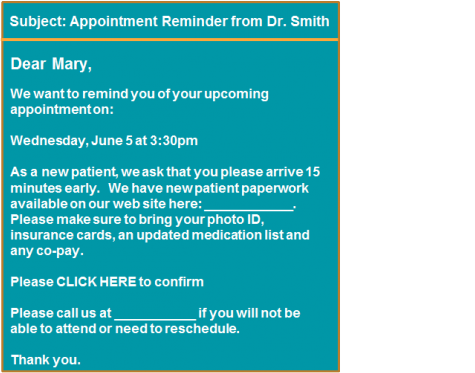
Email

Email Features

[bsf-info-box icon=”Defaults-check” icon_size=”32″ title=”Easy to Confirm” hover_effect=”style_2″ pos=”top”]It s easy to click a link to confirm the appointment.[/bsf-info-box]
[bsf-info-box icon=”Defaults-globe” icon_size=”32″ title=”Patient Language” hover_effect=”style_2″ pos=”top”]We can send emails in English and Spanish.[/bsf-info-box]
[bsf-info-box icon=”Defaults-phone” icon_size=”32″ title=”Prompt Call to Change” hover_effect=”style_2″ pos=”top”]Keep your schedules fuller and re-schedule your patients immediately by prompting the patient to call your clinic to re-schedule or cancel their appointments.[/bsf-info-box]
[bsf-info-box icon=”Defaults-cog gear” icon_size=”32″ title=”Customization / Preparations” hover_effect=”style_2″ pos=”top”]You can customize the language in the appointment reminder email based on your specific needs. Common customizations include new-patient welcomes, and other appointment specific preparation instructions.[/bsf-info-box]

Reduce your patient no-shows up to 70% and save many hours of staff time with our convenient 2-way Appointment Reminders (Call, Text or Email)

[ult_buttons btn_title=”TRY IT NOW” btn_align=”ubtn-center” btn_size=”ubtn-custom” btn_width=”230″ btn_height=”60″ btn_padding_left=”20″ btn_padding_top=”20″ btn_title_color=”#ffffff” btn_bg_color=”#1e5774″ icon_size=”32″ btn_icon_pos=”ubtn-sep-icon-at-left” btn_font_family=”font_family:Arimo|font_call:Arimo” btn_font_size=”desktop:20px;”]